Bank of America personal financial statement form, filled in for you.
The Bank of America personal financial statement form is the 3-page PDF Bank of America asks each owner of a business to fill out when the business applies for a loan. StatementsReady fills it in for you. Add your numbers once, or sync them from your accounts, and download the bank’s own form with your income, balance sheet and schedules A to I already on it.
 By Garrett Pierson, Founder & Commercial Real Estate Agent
Build your statement free for 7 days. No credit card.
How it
works.
You enter the numbers once. Bank of America’s form comes out filled in.
Add your numbers
Connect banks, brokerages and loans read-only through Plaid. Or upload a statement and let Smart Import read it, or type a figure in.
Pick the Bank of America form
When you create the PDF, choose “Bank of America form”. Your profile, income, balance sheet and schedules A to I go onto the bank’s own 3 pages. Rows that don’t fit go on a continuation page.
Sign and send
Sign in StatementsReady, with a co-applicant on the same page, and send it to your banker. A few boxes stay blank, such as average balances. To fill those in, download the PDF, type them in and sign that copy by hand.
If you’re married, read the top of page 1. The co-applicant part is for a joint request, or for anyone in a community property state (AZ, CA, ID, LA, NV, NM, TX, WA or WI). In those states, Bank of America treats a married applicant’s assets, income and debts as shared unless you say otherwise. Add your spouse as a co-applicant and their details fill that part.
A filled-in
sample.
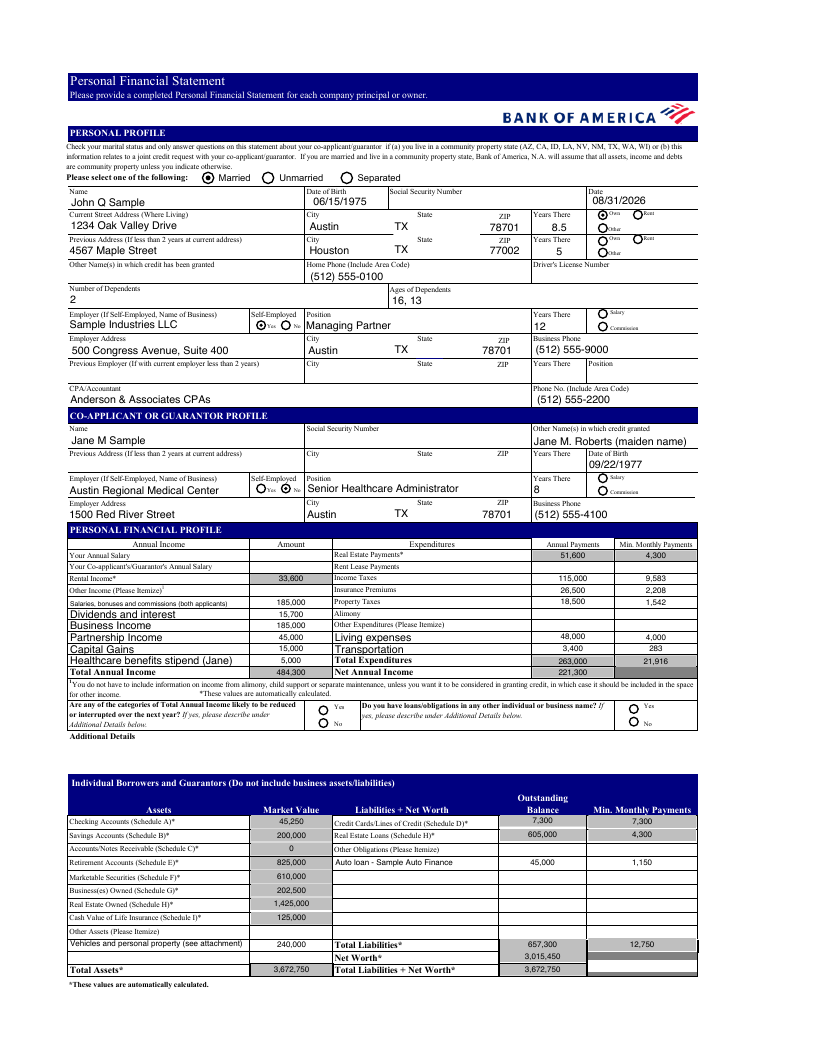
Page 1 of Bank of America’s form, made from a sample joint statement. Every name and number on it is made up.
What each section
asks for.
Page 1 has your profile, your income and a balance sheet. The 9 lettered schedules that feed it fill page 2, and page 3 is the questions and signatures.
| Part of the form | What it asks for | Filled in from |
|---|---|---|
| Personal profile | Marital status, birth date, Social Security number, 2 years of addresses, dependents, employer and your CPA. | Personal and employment details. You enter the SSN when you create the PDF |
| Co-applicant or guarantor | The same details for a second person, only if you apply jointly or live in a community property state. | The co-applicant on a joint statement |
| Personal financial profile | Yearly income (salary, rental, other) and yearly expenses (real estate payments, rent, income taxes, insurance, property taxes, alimony). | Income and expenses |
| Schedules A and B | Checking and savings accounts: average balance, current balance, bank and how long you’ve banked there. | Bank accounts. Average balance is left blank |
| Schedule C | Accounts and notes receivable: who owes you, when, and how much. | Notes receivable |
| Schedule D | Credit cards and credit lines: balance, lender, minimum payment, date opened and rate. | Credit cards and credit lines |
| Schedule E | Retirement accounts: 401(k), Roth IRA, traditional IRA, IRA rollover, SEP or SIMPLE. | Retirement accounts |
| Schedule F | Stocks, bonds, mutual funds, cash and 529 plans, with owner, value and brokerage. | Securities |
| Schedule G | Businesses you own: percent owned, value and how long you’ve owned it. | Business interests |
| Schedule H | Real estate: address, lender, purchase date, rent, value, rate, maturity, payment and loan balance. | Real estate, property by property |
| Schedule I | Life insurance: term, whole life or variable, death benefit, owner, cash value and beneficiary. | Life insurance |
| Other assets and obligations | Lines you itemize yourself. The form has no schedule for car or student loans, so they go here. | Vehicles, personal property and loans, with the full list on a continuation page |
| Questions | Yes or no: lawsuits, repossessions, bankruptcy, felonies, citizenship, contingent liabilities, trusts and military service. | Your legal answers. The co-applicant column is left for them to tick |
Checked against the StatementsReady app on November 23, 2026. All 9 lettered schedules are filled in. A few boxes stay blank because the app doesn’t track them, such as the average balance on Schedules A and B and the rewards question on Schedule D. The downloaded PDF can still be typed into, so add those and sign that copy by hand. A copy you e-sign in StatementsReady is made fresh from your statement, so those boxes stay blank on it.
The form’s signature page says what else Bank of America can ask for: a balance sheet and income statement for the current year, a signed business debt schedule, and 2 years of business and personal tax returns. SBA loans and requests over $1 million need 3 years of returns. Want to see the blank first? It’s on Bank of America’s small business loan site: Personal Financial Statement (PDF).
What
you get.
The free trial is for building your statement. The Bank of America form comes with every paid plan.
- Bank of America’s 3-page form with your numbers on it
- Continuation pages for rows the form has no room for
- A co-applicant on the same statement, with both signature lines
- Schedule totals that match your balance sheet to the dollar
- SBA Form 413 and the Chase form too, if your banker asks for one
- 3 PDF layouts, plus Word and Excel copies you can edit
Bank of America is a trademark of Bank of America Corporation. StatementsReady isn't affiliated with or endorsed by Bank of America.
Common questions.
Still have a question?
Get in touch
Where can I download the Bank of America personal financial statement form?
How do I fill out a personal financial statement form?
How do I print a Bank of America bank statement?
Where can I download a free personal financial statement template?
Start your statement.
Free for 7 days. No credit card.