
Wells Fargo personal financial statement form, line by line.
The Wells Fargo personal financial statement form is the form Wells Fargo gives business borrowers and guarantors to list what they own and what they owe. It comes up on business real estate financing, the Prime Line of Credit and SBA loans. Wells Fargo provides the form, so ask your banker for it. StatementsReady lists and adds up your accounts, property and debts by schedule, so you can copy them onto it in one sitting.
 By Garrett Pierson, Founder & Commercial Real Estate Agent
Build your statement free for 7 days. No credit card.
Which Wells Fargo
form you get.
Wells Fargo has more than one personal financial statement. Which one your banker sends depends on the loan.
| Loan | Form | Who fills it out |
|---|---|---|
| Business real estate financing | “Personal Financial Statement, Business Real Estate Financing” (form 593412, 3 pages) | Each individual guarantor. Co-guarantors whose assets and debts are all joint can share one. |
| SBA 7(a) or 504 loan | “Personal Financial Statement, WFSBA Lending” (form 595552) | Individual applicants, each owner of 20% or more (directly or indirectly), and anyone giving a guaranty. Wells Fargo’s form also asks for a spouse’s or domestic partner’s assets and signature. |
| Prime Line of Credit | A personal financial statement, listed as “form provided” | Wells Fargo lists it next to 2 years of personal tax returns, 2 years of business tax returns and 2 years of year-end business financial statements. |
The SBA version is Wells Fargo’s own form, separate from SBA Form 413. The SBA’s lending rules (SOP 50 10 8.1) let a lender use Form 413 or its own equivalent, signed and dated within 90 days of submission. If your banker asks for Form 413 instead, StatementsReady fills that one in.
Read on November 20, 2026 from copies of the two forms (the real estate form is the 07/16 edition) and from Wells Fargo’s business line of credit FAQ. Your banker’s copy may be newer, so fill in the one you are sent.
What the form
asks for.
Both versions use numbered schedules for what you own and lettered schedules for what you owe, with a few differences noted below. The asset, debt and real estate totals carry to a summary box that shows your net worth.
| Schedule | What goes on it |
|---|---|
| Schedule 1 | Cash in bank accounts. The SBA version widens this to liquid assets, such as stocks and short-term bonds, and asks for statements to back up the balances. |
| Schedule 2 | Investments and retirement accounts such as 401(k)s and IRAs, each marked retirement or not. |
| Schedule 3 | Other assets: vehicles, boats and cash-value life insurance. The real estate version adds partnerships and proprietorships. |
| Schedule A | Revolving credit: credit cards and credit lines, with the limit and the balance. |
| Schedule B | Installment loans, such as car, boat and furniture loans, with the payment and the balance. |
| Schedule C | Other liabilities, such as maintenance payments, lawsuits, tax penalties and contract debts. |
| Schedule D | Contingent liabilities, such as partnerships and guarantees, on the real estate version. They get their own schedule and stay out of total liabilities. |
| Real estate schedule | Each property: type, use, owner, ownership percentage, mortgages, lender, payment, property tax, insurance and rent. |
| Income and questions | On the real estate version: income by source, then 3 yes-or-no questions on bankruptcy, felony convictions and other debts you guarantee. |
How StatementsReady
helps.
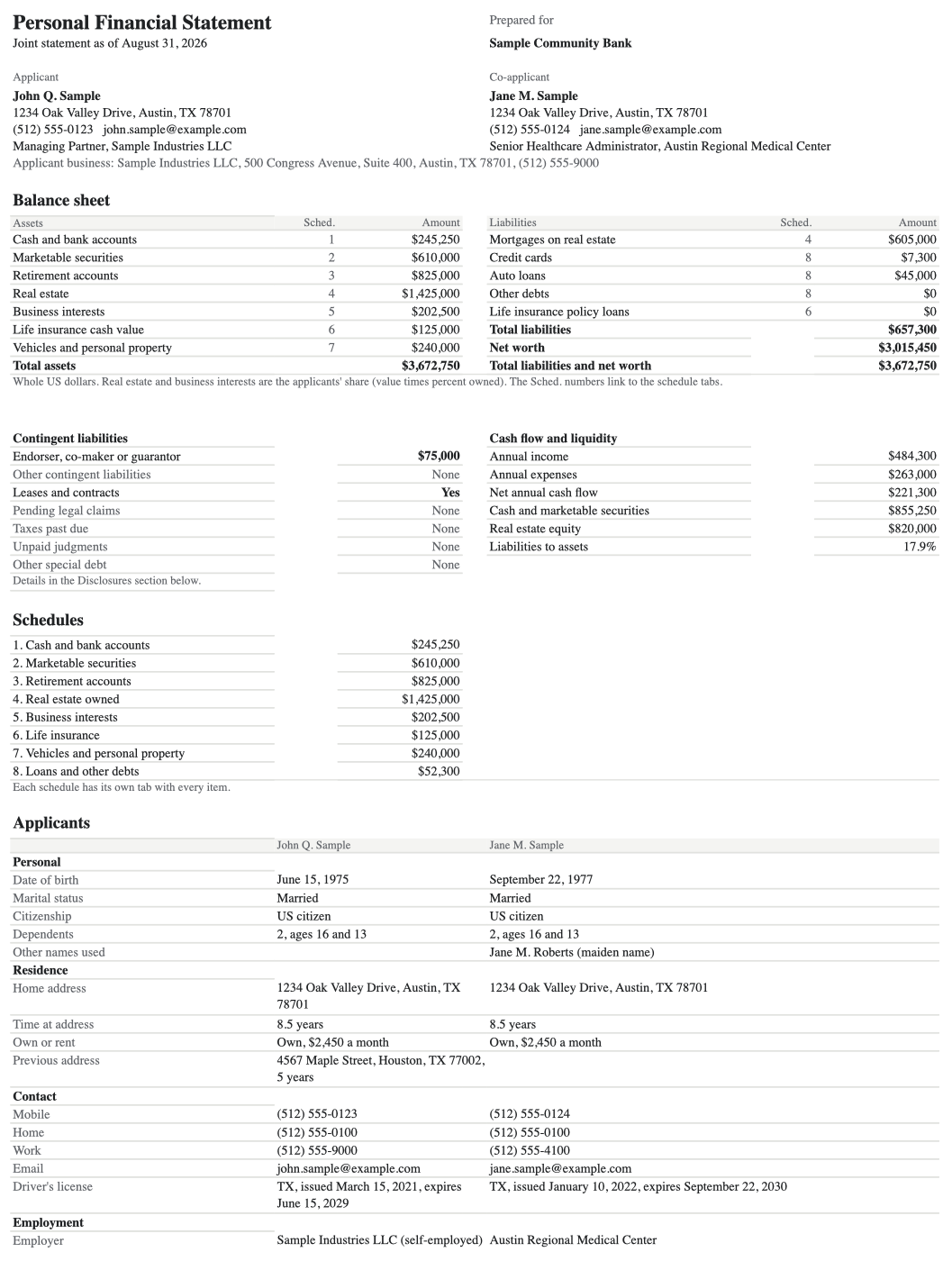
StatementsReady gets every number the form asks for added up and in one place. You still fill in Wells Fargo’s own form yourself.
Add your numbers
Link banks, brokerages and loans read-only through Plaid, upload a document and let Smart Import read it, or type the figures in.
Get totals by schedule
Cash, securities, retirement, real estate, personal property and debts are each listed and added up. The Excel copy puts each one on its own tab.
Copy, sign and send
Copy each line and its total onto the matching Wells Fargo schedule. Wells Fargo groups a few items differently (retirement accounts sit with investments on Schedule 2), so check each schedule heading as you go. Then sign the form and send it to your banker.
What
you get.
Build the statement on the free trial. The Word and Excel copies, SBA Form 413 and the Chase form come with every paid plan.
- One statement with every account, property and debt added up
- Individual or joint, with a co-applicant on the same statement
- Real estate listed property by property, with value, mortgage, payment and rent
- Contingent liabilities listed, such as loans you guarantee
- 3 PDF layouts, plus Word and Excel copies you can edit
- SBA Form 413 filled in, if your banker asks for that one instead
Wells Fargo is a trademark of Wells Fargo & Company. StatementsReady isn't affiliated with or endorsed by Wells Fargo.
Common questions.
Still have a question?
Get in touch
Where do I get the Wells Fargo personal financial statement form?
How do I fill out the Wells Fargo form?
Is a personal financial statement the same as a Wells Fargo account statement?
Is there a free personal financial statement template?
Start your statement.
Free for 7 days. No credit card.